
ASO Guide 2026
A practical, practitioner-backed ASO system. The goal isn’t “rank for more keywords.” The goal is to create a repeatable engine for visibility → conversion → sustainable growth.
Start here
- What ASO is (and isn’t)
- Why ASO matters in 2026
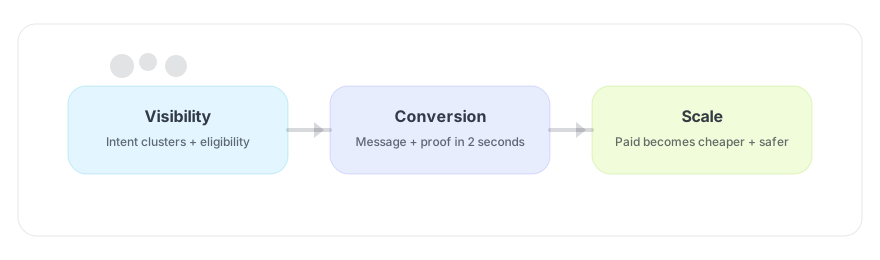
- The ASO system: Visibility → Conversion → Scale
- Keyword strategy (clusters, intent, and adjacency)
- Metadata optimisation (App Store + Google Play)
- Creative optimisation (icons + screenshots + story)
- CPPs & Custom Store Listings (intent landing pages)
- Ratings & reviews (trust as a conversion lever)
- Measurement & experimentation
- A weekly ASO workflow (what to do every week)
- Common mistakes (and what to do instead)
- Tools & data (where APPlyzer fits)
1) What ASO is (and isn’t)
App Store Optimization is the process of improving your store listing so you:
- Show up for the right intent (visibility), and
- Win the install when a user lands on your page (conversion).
ASO is not a one-off project. In competitive categories, it behaves like a product discipline: continuous iteration, testing, and maintaining a clear story.
2) Why ASO matters in 2026
ASO matters because app stores are the highest-intent environments in mobile. Users search when they’re close to choosing. That makes your store page a make-or-break step in the funnel.
ConsultMyApp’s framing is useful here: sustainable growth is a partnership between acquisition and engagement. ASO sits at the front of that system - it decides whether the traffic you pay for (or earn) becomes real users.
Source references: CMA - Sustainable App Growth · CMA - ASO services overview
3) The ASO system: Visibility → Conversion → Scale
A simple ordering that keeps teams honest:
- Visibility: if users can’t find you, nothing else matters.
- Conversion: being seen is not being chosen. Win the install.
- Scale: paid growth becomes safer and cheaper once visibility + conversion are stable.
CMA perspective on “visibility as a system”: Demystify the App Store.
4) Keyword strategy (clusters, intent, adjacency)
Keyword work is where most teams overcomplicate. The goal is not to collect a giant list. The goal is to build intent clusters that map to real user motivations.
4.1 Build intent clusters
- Category terms: the broad “why I’m here” intent.
- Feature terms: the “how it works” intent.
- Outcome terms: the “what I want to achieve” intent (often highest conversion).
- Competitor adjacency: terms where you can credibly be considered.
4.2 Prioritise “close enough to win”
For most teams, the highest ROI is often in queries where you already have some visibility (e.g., positions 10–20) and can improve rankings with better conversion through creative and copy optimization.
- Keyword: macro tracker - search score 48, max est. daily impressions 2,967. Example ranking: MyFitnessPal ranks #4.
- Keyword: sleep tracker - search score 47, max est. daily impressions 2,790. Example ranking: Sleep Cycle ranks #3.
- Keyword: deep sleep - Sleep Cycle ranks #3 (US iOS). Useful for validating outcome-led sleep intent and screenshot message-match.
Data points pulled via APPlyzer tooling (keyword search score + ranks) on 2026-02-16.
Sleep Cycle (US iOS) - first screenshot framing for sleep tracking intent & strong social proof:

Source: App Store screenshot URL (resolved via APPlyzer app metadata).
5) Metadata optimisation (App Store + Google Play)
Metadata is both a discovery tool and a promise. It needs to match what users searched for and what your creative shows.
5.1 App Store
- Title + subtitle: include the clearest category/outcome signals (not slogans).
- Keyword field: cluster coverage; avoid repetition; focus on intent families.
- Consistency: your creative should visually reinforce the words you use to rank.
5.2 Google Play
- Title + short description: typically carry heavy weight for both conversion and meaning.
- Long description: don’t treat as filler; structure it around features + benefits + trust.
- Store listing experiments: use variants to validate claims with real data.
6) Creative optimisation (icons + screenshots + story)
Your screenshots are not decoration. They’re the decision point of the funnel - the one step everyone passes through.
CMA’s 10 principles (must-read): How to make screenshots convert.
6.1 The first three screenshots
- #1 should confirm relevance fast: one promise, one proof.
- #2–#3 should deepen the story: how it works + why it’s trustworthy.
- If #1 is vague, the rest rarely matters.
6.2 Keywords should shape your screenshots
If someone searches “sleep tracker”, they expect a night-time frame and outcomes. If they search a competitor, they expect contrast. Your creative should complete that expectation.
7) CPPs & Custom Store Listings (intent landing pages)
CPPs let you show different creative based on query/campaign. The opportunity isn’t building more pages - it’s building the right pages.
A useful framework from CMA is to label each page as either:
- Intention-led: confirm what the user already wants (high-demand category terms).
- Attention-led: intercept and reframe (competitor terms / seasonal moments).
Source reference: CMA - CPP opportunities.
8) Ratings & reviews (trust as a conversion lever)
Ratings reduce perceived risk. Reviews tell you what your market is confused about - and therefore what your screenshots and copy should clarify.
- Build a review ask around moments of success (not on day 1).
- Respond to the loudest themes; fix the underlying product friction where possible.
- Use review language to improve screenshot headlines (users tell you what they value).
9) Measurement & experimentation
Don’t “optimize” without a measurement story. Tie changes to outcomes:
- Store conversion rate (views → installs)
- Downstream value (payback, retention)
- Incrementality where possible (geo splits / controlled windows)
If impact is unclear: state it and monitor. Not every change moves the needle immediately.
10) What influences ranking (practitioner view)
Exact ranking factors are not published end-to-end, but the operational reality is consistent: stores reward apps that satisfy intent. In practice, that means you should manage:
- Relevance signals: metadata + on-page story matching the query.
- Conversion signals: better product page performance tends to sustain visibility.
- Trust signals: ratings/reviews and reputation reduce perceived risk.
- Behaviour signals: retention/engagement shape whether installs become “good” installs.
Treat ranking as a side-effect of relevance + conversion + product quality, not as a standalone game.
11) Apple vs Google: what to do differently
Most teams copy/paste their approach between stores. Don’t. The mechanics differ.
11.1 App Store
- CPPs let you tailor creative to intent without bloating the default page.
- Metadata fields behave like a constrained puzzle: you need clustering discipline.
- PPO testing is slower - treat it like product work, not ad creative churn.
11.2 Google Play
- Custom Store Listings + experiments allow faster iteration and more segmentation.
- Descriptions matter more; structure them to reduce uncertainty and increase trust.
- Device/region context can shape what “relevance” looks like; segment where possible.
12) Localization (where many teams leave money)
Localization isn’t translation. It’s aligning your promise and proof with local intent.
- Start with your top 2–3 markets by value (not by installs).
- Localize screenshot headlines first; they often drive the biggest CVR lift.
- Check competitor norms: what “trust” looks like differs by market.
13) Testing: how to run PPO without wasting cycles
If you want faster learning, keep tests narrow:
- Test screenshot #1 first (it usually drives the largest delta).
- Change one thing at a time: promise, proof, or framing - not all three.
- Document the hypothesis in one sentence (what we expect to increase, and why).
- Ship a cadence: one test live, one in production, one in ideation.
If you can’t interpret a result, the test was too broad.
14) A weekly ASO workflow
A simple cadence that keeps work shippable:
- Monday: review visibility (clusters, rank movement), pick 1 hypothesis.
- Wednesday: review creative (screenshot #1), draft 1 change.
- Friday: publish change or run PPO test; write a short read-out.
If you’re doing more than one major listing change at a time, you’re making the results harder to interpret.
14) Common mistakes
- Chasing volume: ranking for broad terms that don’t convert.
- Design-first screenshots: pretty UI without a promise/proof story.
- No segmentation: one product page for every intent.
- No cadence: “ASO as a project” instead of a system.
- Doing everything at once: multiple changes with no ability to attribute the result.
15) How ASO and Apple Ads work together
In practice, ASO and Apple Ads are two sides of the same store system:
- ASO earns organic visibility and improves conversion.
- Apple Ads accelerates learning and captures high-intent traffic you may not own organically yet.
The best teams use paid queries to learn what messaging converts, then feed that back into screenshot headlines, CPP strategy, and metadata.
16) Quick FAQ
How long does ASO take?
Treat ASO like a compounding system. You should see early wins from creative clarity and intent focus, but durable ranking improvements typically require consistent iteration.
Should we do ASO or Apple Search Ads first?
If your conversion is weak, fix your listing first - it improves both paid and organic. If you need faster learning on messaging, Apple Ads can accelerate insight, but only if you can act on the learnings.
Do CPPs help ranking?
CPPs primarily help conversion by matching intent. Better conversion can help sustain visibility over time.
17) Tools & data (where APPlyzer fits)
Use tools to shorten the path from question → evidence → action. APPlyzer is most valuable when it helps you:
- Find keyword clusters with meaningful demand
- Spot “close enough to win” opportunities (rank 10–30)
- Compare competitor metadata + creative patterns
- Add data-backed evidence blocks to editorial content (rank/volume/download estimates)
Where to go next
These guides cover the other parts of the App Store Marketing system.
 What is App Store Marketing?The holistic system (discovery → ambassador)
  Apple Search Ads GuideStructure, bidding, incrementality
  ASO ChecklistA weekly routine for compounding wins
  App Marketing ToolsA lean stack for evidence + iteration
 Editor: App Store Marketing Editorial Team
Insights informed by practitioner experience and data from ConsultMyApp and APPlyzer.